
Price history and phases
Use price history and phases when a subscription changes price, region or plan, or resumes after a break.
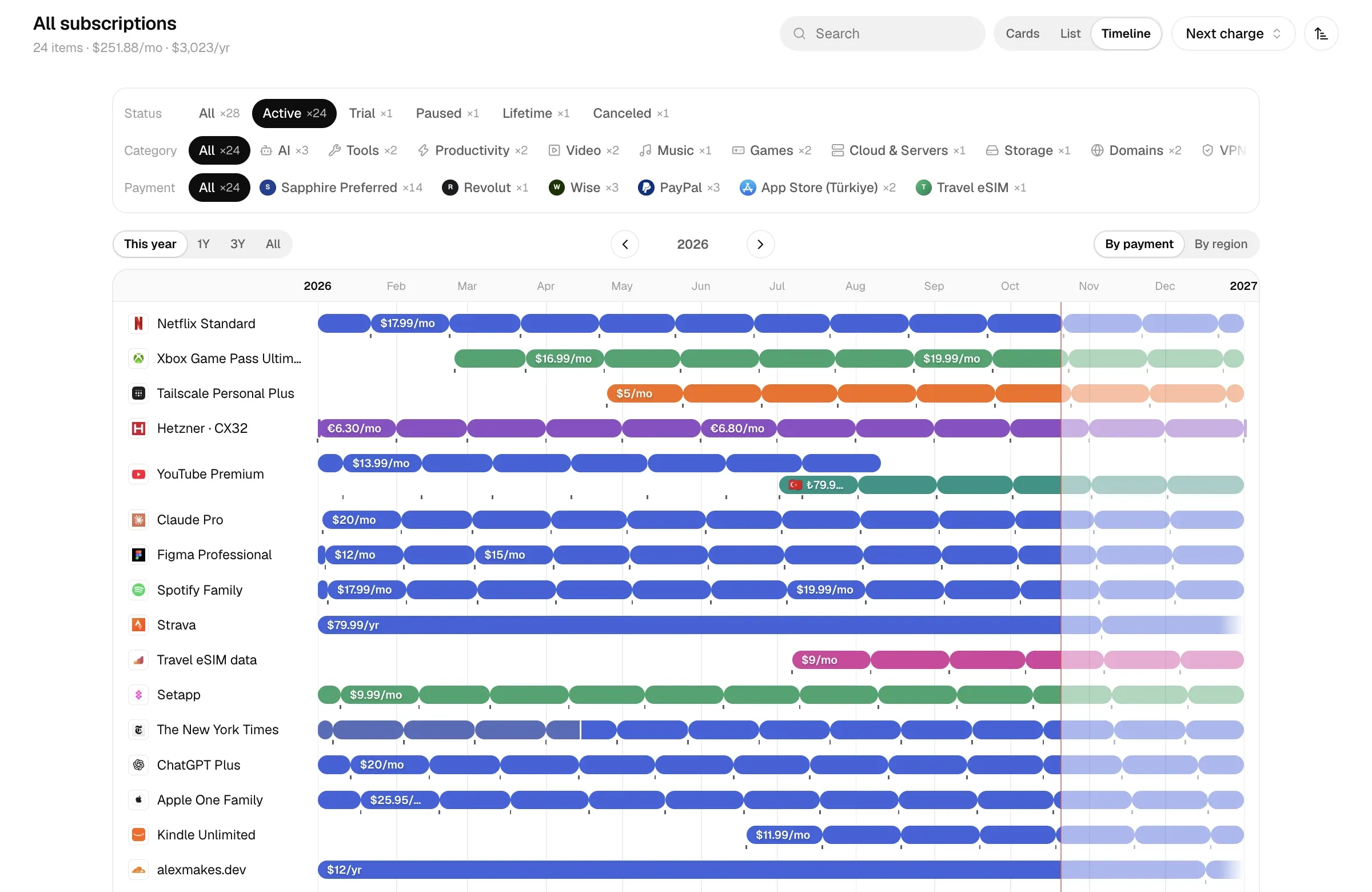
A subscription goes through a lot: the vendor raises the price, you move from the US store to Turkey, monthly becomes yearly, you cancel for a year and come back. Calends doesn’t record these as unrelated subscriptions; they all go into the same subscription’s history.
Use History & changes at the bottom of the editor. Changes take effect when you save the editor.
Two kinds of change
Section titled “Two kinds of change”- Price change: the price changed within the same plan. It goes into the current phase’s price history; currency, cycle and payment method stay the same.
- New phase: the region, currency, cycle or payment method changed, or you resubscribed after a gap. Within one phase these never change.
Record a price change
Section titled “Record a price change”- Expand History & changes in the editor and click Record price change.
- Enter New price starts and the new price.
- Finish the change and save the editor.
- Charges on or after that date use the new price; earlier charges keep the old one.
- Dates before the first price record use the first price.
- Subscriptions whose price went up in the past year show up in the checkup.
Change region, plan or payment method
Section titled “Change region, plan or payment method”Click Change region, plan or payment method, enter Change takes effect, then the new price, currency, cycle, payment method and region.
By default the switch is seamless: the previous phase ends on that date and the new one starts the same day.
Running side by side
Section titled “Running side by side”A common case: your US account is paid up until next March, and today you started a new one in the Turkish store. Turn on Keep the old one running and set Old one runs until:
- the two phases overlap in time and are both billed as usual;
- monthly cost during the overlap is the sum of both;
- the detail page lists the previous plan under Also running, with the date it runs until;
- when you record a charge dated inside the overlap, you choose which phase it Belongs to.
Just planned
Section titled “Just planned”Tick Not final, just planned: the phase still counts in forecasts (future charges, runway, top-up plan) and is marked Planned. When the time comes, use Confirm switch or Don’t switch on the detail page.
Don’t switch deletes the planned phase, and the previous phase ends on the planned switch date — in other words, it won’t renew. If the previous phase already had a later end date of its own (running side by side), that date is kept.
Lapses and resubscribing
Section titled “Lapses and resubscribing”When you come back after a break, click Resubscribe and enter Resubscribed on. The previous phase keeps its own end date, and the gap in between is the lapse.
Gaps of 3 days or less don’t count as a lapse (renewing a day or two late, time zone differences). Longer gaps show as Lapsed on the timeline, and the detail page says “Lapsed n months” or “Lapsed n days”.
If an older phase running side by side covers the gap, it isn’t a lapse.
Undo latest phase removes the last phase. If the phase before it only ended because of that switch, it becomes ongoing again. With only one phase left, the subscription goes back to being a plain subscription.
Add earlier history
Section titled “Add earlier history”If there’s history before the subscription’s start (say it was a one-time purchase before it became a subscription), ask the built-in assistant to add it, or use the MCP tool change_plan with action=earlier. That phase runs until the original first phase starts by default; with an end date, the time in between counts as a lapse.
The subscription’s end date and pause
Section titled “The subscription’s end date and pause”The subscription’s end date and pause date apply to every phase: planned phases that would start after the end date are dropped, and phases that run past it (including an older phase running side by side) stop on that day. The last phase’s end date is the subscription’s end date; if an older parallel phase runs longer, the later date wins.
Where you see all this
Section titled “Where you see all this”- History on the detail page: subscribed, plan switched, price change, back to regular price, paused, lapsed, ended and more — plus the number of phases and lapses.
- The Timeline view: one bar segment per phase, with lapses, planned phases and intro offers marked.
- The changelog in Reports: every spending decision and its effect on monthly cost. A region or plan switch is one “Switched region / plan” entry; coming back after a lapse is “Resumed”. See Report metrics.
- Subscribed for on the detail page: how long you’ve actually been subscribed, minus lapses, without double-counting overlapping phases.