
Public page
Turn on the public page when you want to share a subscription overview, choose what appears and review what data is exposed.
The public page is a read-only overview of your subscriptions — something to link from a personal site, or to show friends how much you spend each month. It’s off by default.
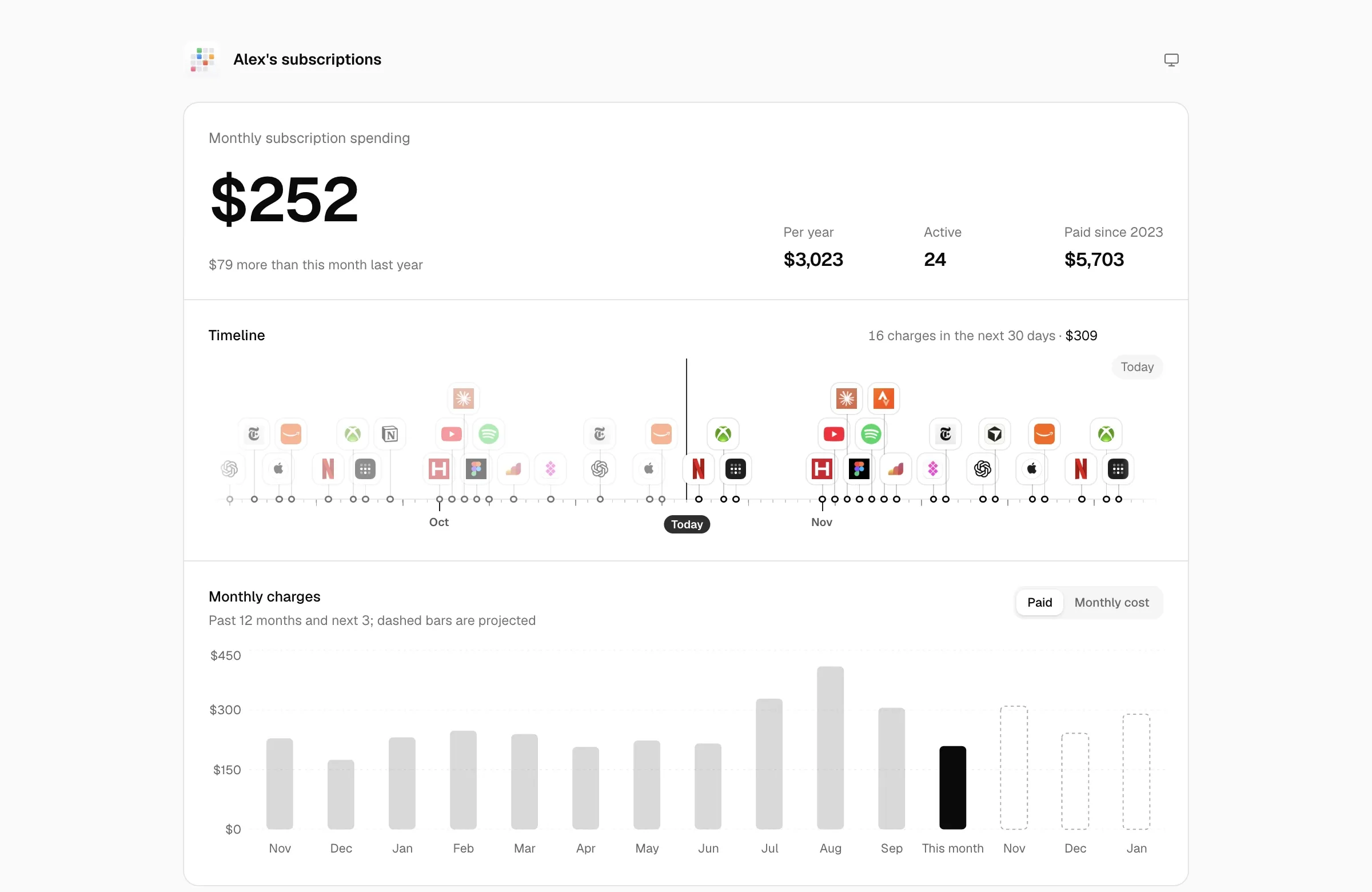
- Set your name and avatar under Settings → General.
- Turn on Public page under Settings → Sharing & access and optionally set Page title.
- Choose items under Shown subscriptions, then click Preview public page.
- Before sharing, check the page in a signed-out window.
Turning it on
Section titled “Turning it on”Turn on Settings → Sharing & access → Public page and the site root becomes the public page, e.g. https://calends.example.com/. The app stays at /admin.
While it’s off, visitors to the root are told the ledger isn’t public.
Once it’s on, the same section also has:
| Setting | Details |
|---|---|
| Shown subscriptions | Only the ticked subscriptions appear. New subscriptions are shown by default; use Show all, Hide all or toggle them one by one. |
| Page title | The title in the page header and browser tab. Defaults to “Name’s subscriptions” (or a generic title if no name is set). |
| Preview public page | Opens the public page in a new tab. |
Set your name and avatar under Settings → General. The name is used on the public page and share images. The avatar is used in the sidebar, public page and shared plans; share images currently do not use the custom avatar.
What visitors see
Section titled “What visitors see”- Monthly subscription spend, compared with the same month last year; roughly how much per year; how many subscriptions are being paid; total paid since a given year.
- Timeline: number and amount of charges in the next 30 days.
- Monthly charges: the past 12 months and the next 3, switchable between paid and monthly cost, with projected months dashed.
- Breakdown: monthly cost by category.
- Exchange rates: how much more or less you spend per month compared with exchange rates a year ago.
- Subscribed: each subscription’s name, icon, price, monthly equivalent and renewal date.
- Cancelled, with how much less you spend per month; Lifetime purchases are listed separately.
Visitors can switch the display currency and the light or dark theme. The page language follows the visitor’s browser.
Server-side masking
Section titled “Server-side masking”The public data is generated separately on the server, so the browser never receives the originals. Only allow-listed fields are sent:
| Content | Handling |
|---|---|
| Paid for others | Involves other people, so never shown. |
| Subscriptions hidden in Settings | Not sent. |
| Shared plan members | Only per-period shares and paid-through dates; no names, contacts or invited accounts. |
| People list | Not sent. |
| Payment methods | Only type, currency, region and color; the name becomes “type · region” (e.g. “App Store balance · TR”). No last 4 digits, phone numbers, balances or notes. |
| Subscriptions | No account, notes or tags; URLs reduced to scheme and domain; notes on charges and phases removed. |
| Domain subscriptions | Name masked to the first letter and top-level domain (e••••••.com), with no URL or icon, and the id replaced by a hash — when Show domain on public page is enabled, the name, URL and original id are restored, but the generic domain icon is still used. |
| Settings | Only base currency, time zone, name, avatar, page title, week start, shared plan currency, and the categories used by public subscriptions. Notification channels, the calendar token and the rest are never sent. |
| Interface preferences | Not sent. |
Which subscriptions count as domains is explained in Categories.