
A tour of the app
Find your way around the app and customize the sidebar, start page and upcoming charges window.
The app lives at /admin. The sidebar is on the left and the current module on the right. On narrow windows (under 860px) the sidebar becomes a drawer you open from the top-left button.
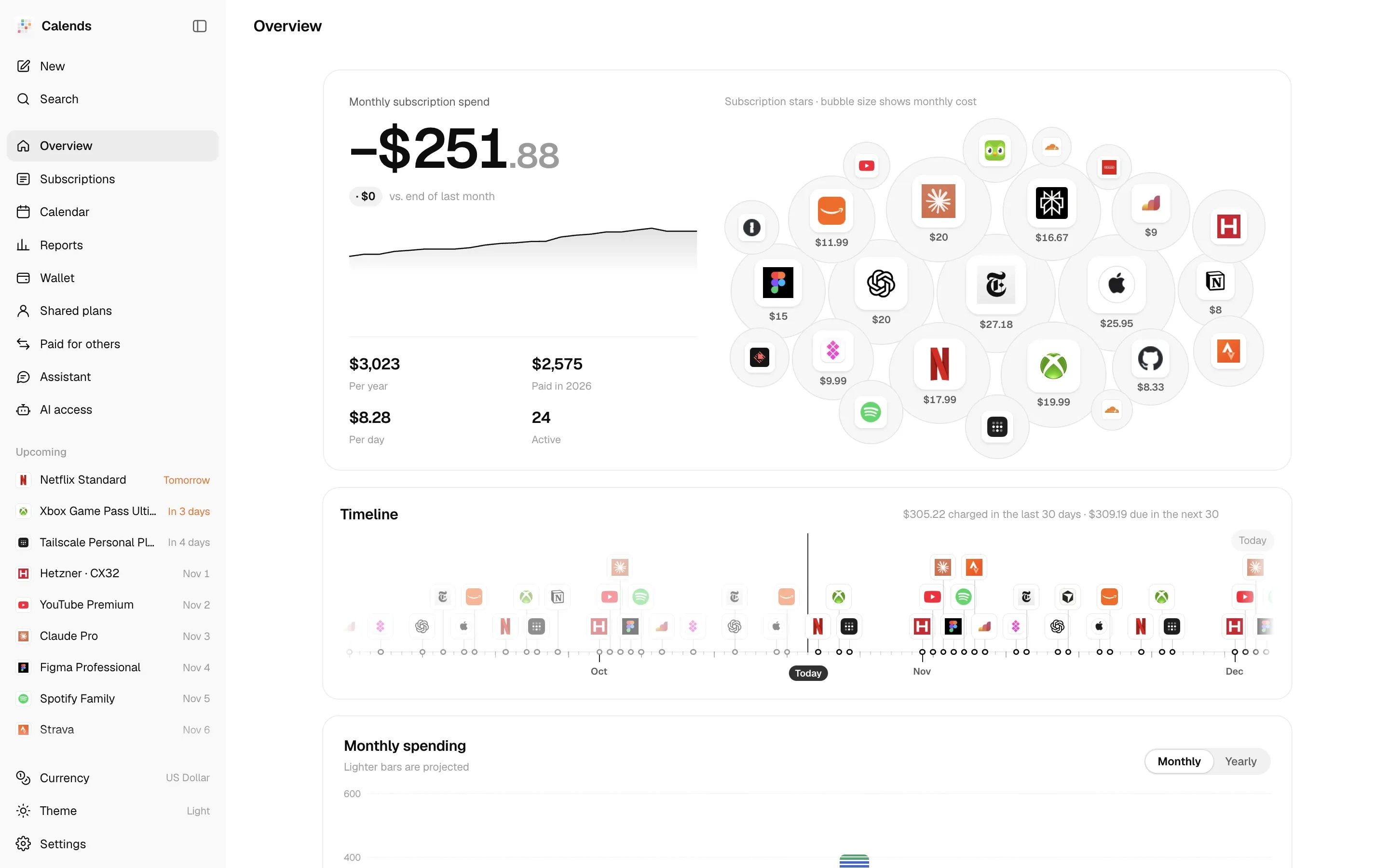
Sidebar modules
Section titled “Sidebar modules”| Module | What’s in it |
|---|---|
| Overview | Monthly subscription spend, change since the end of last month, per year, paid this year, per day; subscription stars (bubble size shows monthly cost); timeline; monthly spending; charges in the next 30 days; a wallet summary; the top items from the checkup. |
| Subscriptions | All subscriptions in Cards, List or Timeline view, filtered by status, category or payment, sorted by next charge, monthly cost, name or start date. |
| Calendar | Month and year views, plus subscribing in your system calendar. See Calendar. |
| Reports | Negative MRR, monthly changes, checkup, cash vs. true cost, where the money goes, top-up plan, changelog. See Report metrics. |
| Wallet | Payment methods and balance runway. See Wallet and balance runway. |
| Shared plans | Plans you organize and plans you’ve joined, plus the People list. See Shared plans and People. |
| Paid for others | Subscriptions you pay on someone else’s behalf and what they owe. See Paid for others. |
| Assistant | The built-in AI assistant. See Built-in assistant. |
| AI access | MCP tokens for external AI assistants. See MCP access. It disappears from the sidebar when AI access (MCP) is turned off in Settings. |
At the top of the sidebar are New (N) and Search (⌘ K / Ctrl K); at the bottom are the theme switch (Light → Dark → System) and Settings.
Customize the layout
Section titled “Customize the layout”- Open Settings → Sidebar and drag a module’s handle to reorder it.
- Hide modules you do not use with their toggles.
- Under Look ahead, choose This month or a number of days, then check upcoming charges in the sidebar.
Reorder or hide modules
Section titled “Reorder or hide modules”Under Settings → Sidebar, drag the handles to reorder. The sidebar follows this order, and so do the number shortcuts. Everything except Overview and Subscriptions can be hidden with its toggle.
Module order, views, sorting, theme, sidebar collapse, shared-plan and paid-for filters, and calendar mode are stored on the server. Other devices read them when loading the ledger. If the same preference is changed on two devices, the last saved value wins.
Start page
Section titled “Start page”Settings → General → Open to picks the page that opens at /admin: Overview, Subscriptions, Calendar, Reports or Wallet.
Upcoming charges
Section titled “Upcoming charges”Below the navigation, Upcoming lists what’s about to be charged, by date — up to 12 items, labeled Today, Tomorrow or In n days. Subscriptions you pay for others aren’t listed here; they have their own page.
Under Settings → Sidebar:
- Upcoming charges turns the panel on or off;
- Look ahead sets how far: This month (to the end of the month), or 3, 7, 14, 30, 45, 60, 90 or 180 days. The default is 45 days.
Three views of your subscriptions
Section titled “Three views of your subscriptions”- Cards: one card per subscription with amount, cycle, next charge and status.
- List: a table with subscription, category, payment method, amount, monthly, start and next charge.
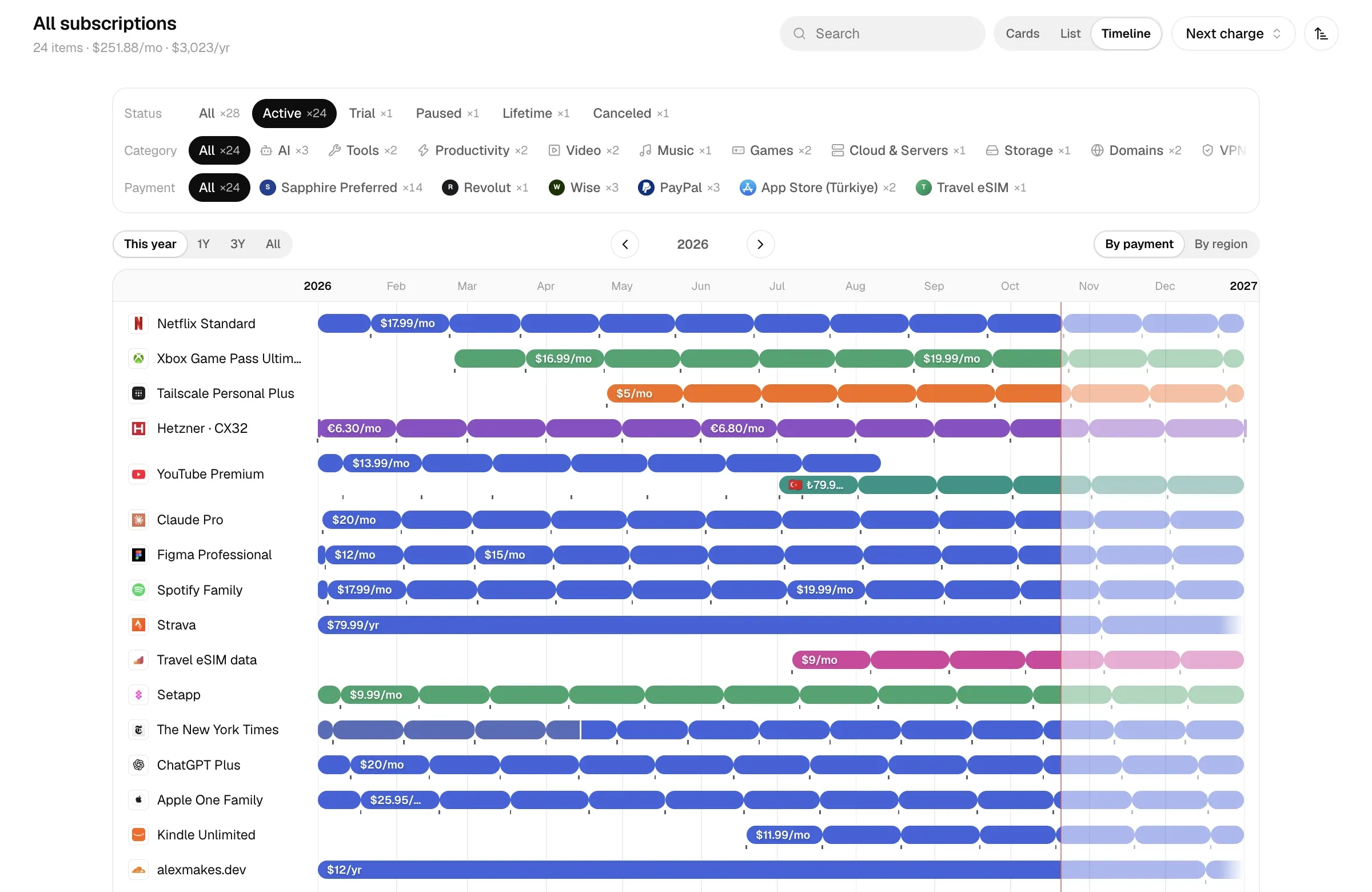
- Timeline: one bar per subscription, showing every phase, lapses, planned changes and intro offers. Zoom to 1Y, 3Y or This year, color by payment or region, move earlier or later, or jump Back to now.
What the status labels mean:
| Label | Meaning |
|---|---|
| Not started | The start date is in the future. |
| Active | Billing normally. |
| On trial | In a trial; nothing is charged before the trial ends. |
| Paused | No charges are projected from the pause date. |
| Not renewing | Has an end date and won’t be charged after it. |
| Canceled | Already over. |
| Lifetime | Paid once. |
Demo mode
Section titled “Demo mode”The live demo runs in demo mode: anyone can browse the full app without signing in, the data is made up, and every change is rejected.