
Wallet and balance runway
Track payment methods and prepaid balances, then use runway and top-up plans to see how many charges remain and when to add funds.
Wallet lists all your payment methods. Each subscription (or each phase of a multi-phase subscription) can be linked to one. Drag cards to reorder.
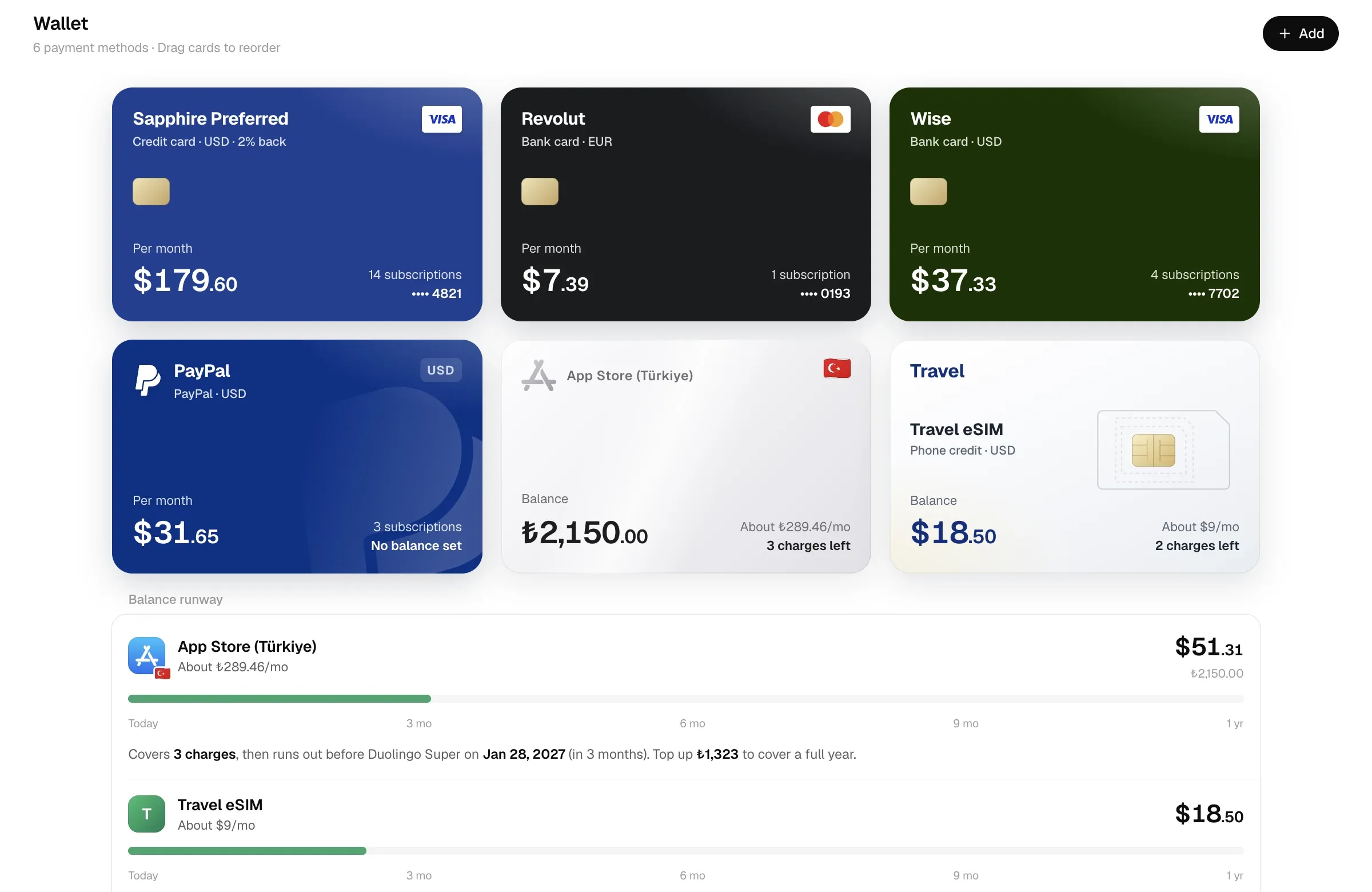
- Open Wallet and click Add.
- Enter the payment method’s name, type and currency. For a prepaid account, also fill in Current balance and As of.
- Save, then select this payment method in a subscription’s editor.
- Return to Wallet and open it to check linked charges under Upcoming charges.
Payment method types
Section titled “Payment method types”| Type | Typical use |
|---|---|
| Bank card, Credit card | Regular debit and credit cards. Pick a card network (Visa, Mastercard, UnionPay and others) and enter the last 4 digits. Include the bank’s name and its icon is detected. |
| Alipay, WeChat Pay, PayPal | Wallet-style payments. |
| App Store balance, Google Play balance | A store balance in one region, usually topped up with gift cards. |
| Gift card | Other gift cards. |
| Store balance | A merchant account you top up first and get charged from. |
| Phone credit | Carrier balance; you can add the phone number (shown only in the app). |
| Crypto card | Crypto-funded cards. |
| Other | Anything else. |
Every payment method has a currency, region and notes, plus optional Website / top-up page, Cashback / points percentage and a custom logo (upload, image URL, website icon or bank icon; tick Wide wordmark for logos that are wider than tall).
Balances and recalibrating
Section titled “Balances and recalibrating”Give a balance-capable payment method a Current balance and an As of date, and Calends subtracts every charge after that date to estimate today’s balance.
Estimates drift (exchange rates, refunds, other spending). When you see the real balance, open the payment method and click Top up / adjust balance:
- Top up: enter the amount; it’s added to the current estimate and the as-of date becomes today. You can also record Amount paid: if you bought a Turkish gift card with yuan, say how much you paid, and the top-up history shows “n% premium” or “n% below market” compared with that day’s rate.
- Set actual balance: overwrite the balance with what you actually see; the as-of date becomes today. You can record a top-up at the same time.
Deleting a top-up record doesn’t change the balance.
Balance runway
Section titled “Balance runway”Payment methods with a balance appear under Balance runway. Calends takes the next 36 months of charges from linked subscriptions, converts them into the account currency at today’s rates, and subtracts them one by one:
| Shown | Meaning |
|---|---|
| About x/mo | The combined monthly cost of the active subscriptions linked to it (account currency). |
| n charges left | How many charges the balance can still pay in full. |
| Runs out before … | The first charge the balance can’t cover, and its date. |
| Top up x to cover a full year | The next 12 months of charges minus the current balance. |
| Enough for the next 3 years | Nothing runs short within 36 months. |
Upcoming charges on the payment method lists every charge and the balance after it.
Runway example
Section titled “Runway example”Alex calibrates a balance to 250 TRY today. The account will pay one 100 TRY charge each month, with no other spending:
| Charge | Balance after | Result |
|---|---|---|
| First | 150 TRY | Covered |
| Second | 50 TRY | Covered |
| Third | −50 TRY | First shortfall; add at least 50 TRY beforehand |
The balance covers 2 full charges. If exactly 12 charges fall in the next year, the total is 1200 TRY and the top-up needed is 1200 − 250 = 950 TRY.
Low balance alerts
Section titled “Low balance alerts”Each payment method has a Low balance alert, 30 days ahead by default. When the first charge the balance can’t cover falls within that window:
- the checkup in Reports shows an alert;
- the daily reminder includes it n days before that charge (n being the alert setting), and again at 14, 7, 3 and 1 days and on the day. See Reminder rules.
Top-up plan
Section titled “Top-up plan”The Top-up plan in Reports answers: over the next 3 months, 6 months or year, how much does each balance account need, and by when?
- Short by: what’s due in that period minus the current balance.
- Most urgent: the minimum to add before the first charge you can’t afford.
- Suggested gift cards: App Store balance, Google Play balance, gift cards and phone credit can only be topped up in fixed amounts, so Calends suggests a combination of built-in denominations (largest first, rounding the last one up). Bank cards, crypto cards and other types say “Top up any amount”.
Built-in denominations:
| Currency | Denominations |
|---|---|
| TRY | 100, 250, 500, 1000 |
| NGN | 5000, 10000, 25000, 50000 |
| PHP | 100, 300, 500, 1000 |
| USD | 10, 25, 50, 100 |
| CNY | 50, 100, 200, 500 |
| INR | 500, 1000, 2000 |
| PKR | 1000, 2500, 5000 |
| EGP | 100, 250, 500 |
Other currencies use a round power of ten matching the size of the amount needed.
No payment method
Section titled “No payment method”Subscriptions without a payment method are listed at the bottom of the wallet. Once you’ve chosen a Default payment method under Settings → Bookkeeping, Use default for all assigns it in one go (subscriptions with multiple phases and ones you pay for others are skipped).