
Report metrics
Understand the report’s metrics when comparing recurring cost, cash charges and savings from cancelling.
Reports express recurring cost as monthly recurring spend (MRR), with a minus sign for money going out. This is different from the cash charged this month.
Common rules
Section titled “Common rules”Monthly and cash metrics use different bases:
- Monthly cost and cash vs. true cost count only your share. For a shared plan you host, only what’s left after members’ shares; for a plan you joined, the price is already your share; subscriptions you pay for others don’t count at all.
- Monthly cost = that day’s price × 30.4375 ÷ days in the cycle × your share ratio.
- Not counted in monthly cost: lifetime purchases, subscriptions not started yet, ended ones (on and after the end date), cancelled, paused (from the pause date) and on trial. For multi-phase subscriptions, every phase running that day is added up — both, if two overlap.
- Shared plan share ratio = (price − the per-period shares of members on board that day who pay) ÷ price, never below 0.
- The year in review and Due in the next 90 days use full charges, before shared-plan contributions.
- Exchange rates: “per month right now” figures use today’s rates; totals and cash figures use each charge’s own day. See Currencies and exchange rates.
Monthly subscription spend
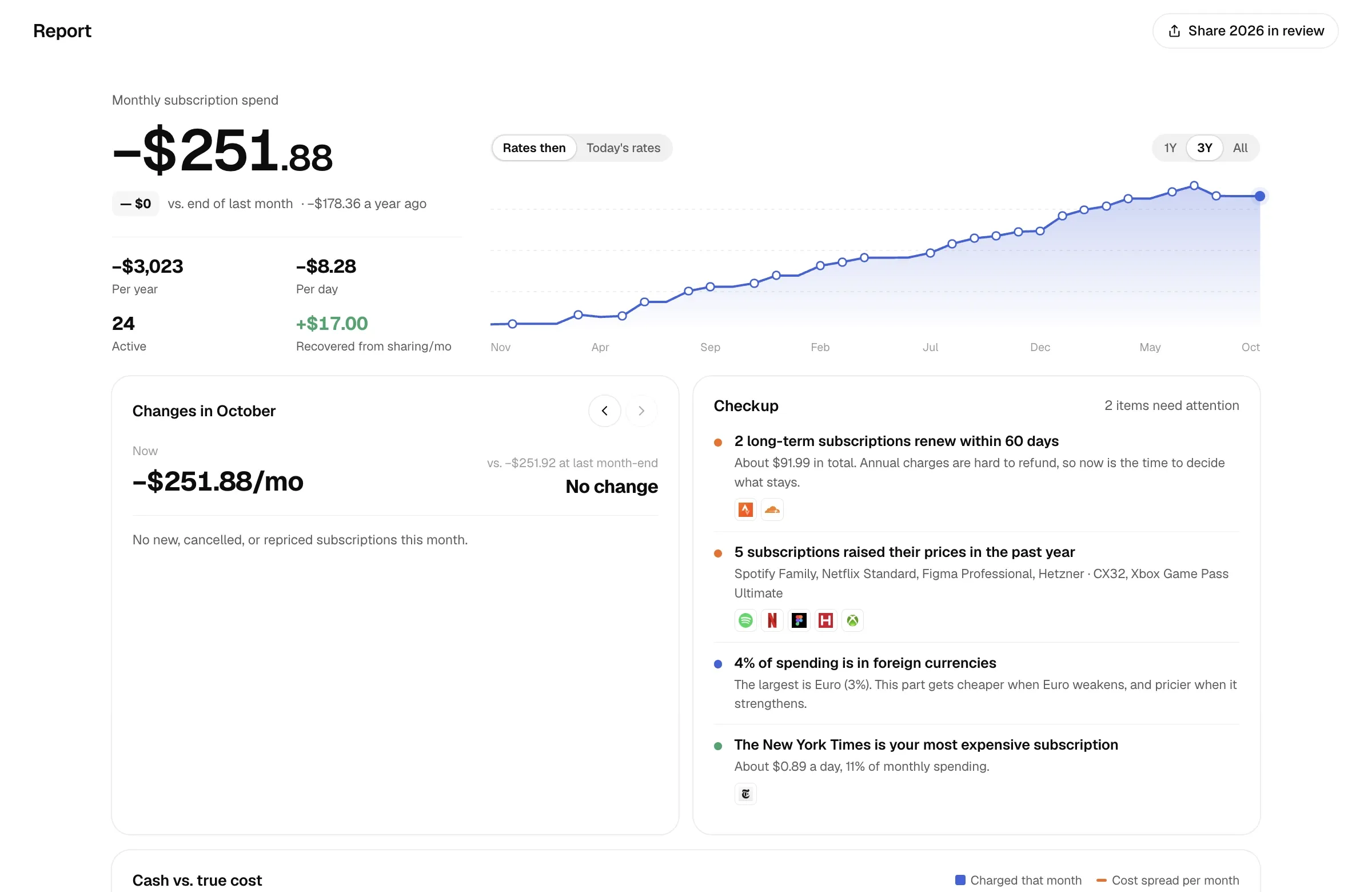
Section titled “Monthly subscription spend”The big number at the top is today’s monthly cost, with a minus sign.
| Figure | How it’s calculated |
|---|---|
| vs. end of last month | Today’s monthly cost − monthly cost on the last day of last month, both at today’s rates, so only subscription changes show up. |
| A year ago | The value 12 months back on the trend chart. |
| Per year | Monthly cost × 12. |
| Per day | Monthly cost ÷ 30.4375. |
| Active | Subscriptions currently billing, excluding trials, paused ones and those you pay for others. |
| Recovered from sharing/mo | For plans you host, what members cover each month (full monthly cost − your share). Only shown if you host a plan. |
The trend chart on the right shows monthly cost at each month end (today for the current month) over 1Y, 3Y or All.
- Rates then: each month at its month-end rate.
- Today’s rates: everything at today’s rates, removing currency swings so you only see subscriptions coming and going.
Months with a start, cancellation, price change or plan switch are marked on the chart.
Monthly changes
Section titled “Monthly changes”A breakdown of how monthly cost changed from last month-end to this month-end (to today for the current month), with bars comparing the size of each driver. Use Previous month and Next month to move around.
| Step | Meaning |
|---|---|
| Last month | Monthly cost on the last day of the previous month, at that day’s rates. |
| FX | The same subscriptions at the same prices, re-valued from last month-end rates to month-end rates. |
| New | Not billing at last month’s end, billing at month end. |
| Price up | Billing at both ends, more expensive at month end. |
| Price down | Billing at both ends, cheaper at month end. |
| Cancelled | Billing at last month’s end, not at month end. |
| Now / Month end | The result. |
New, price up, price down and cancelled are all calculated at month-end rates, so the steps add up exactly to the result. Below the chart, each subscription is listed by size of impact. If only exchange rates moved, you’re told the whole change came from FX.
Checkup
Section titled “Checkup”An automatic check of your ledger. Subscriptions you pay for others are left out.
| Check | When it triggers |
|---|---|
| Yearly renewal window | Subscriptions with a cycle of 180 days or more auto-renew within 60 days; shows the total. |
| Possible duplicates | Same name after stripping region, platform, parentheses and words like Pro, Plus or Premium, same currency, similar price. Shared plans are excluded. |
| Price hikes in the past year | A price change in the last 12 months, and it costs more now than before. |
| Intro offer ending | An intro offer ends within 30 days; shows the intro price and the price after. |
| Low balance | A payment method’s balance won’t cover a charge within its low balance alert window (30 days by default). |
| Currency exposure | How much of your monthly cost is in foreign currencies, and the largest one. |
| No payment method | How many subscriptions aren’t linked to a payment method. |
| Priciest per day | The subscription costing the most per day, and its share of your monthly cost. |
The Overview shows three of these, with “Heads up” items first.
Cash vs. true cost
Section titled “Cash vs. true cost”The bar chart on the left compares two views, from 23 months back to 12 months ahead:
- Charged that month (cash): money charged in that month. Yearly plans create a spike in the month they’re charged.
- Cost spread per month (accrual): each charge is spread over the service period it covers (until the next charge; with no next charge, one cycle, cut short at the end date), then split by month. This is the true monthly cost. Lifetime purchases aren’t included in this line.
Both count only your share, at each charge’s own exchange rate. Future months are marked as forecast, and the busiest forecast month is called out.
The three figures on the right:
| Figure | How it’s calculated |
|---|---|
| Prepaid value | What you’ve paid for but not used yet: latest charge × days remaining ÷ days covered × your share. Prepaid time left on an old region after a switch counts too. Open it to see how long each item lasts. |
| Less per month from cancelling | For subscriptions whose end date has arrived (excluding lifetime and paid-for-others), the monthly cost at the end-date price, cycle and your share, converted at today’s rates. |
| Due in the next 90 days | Full charges from today through 90 days ahead, excluding paid-for-others. Past charges use charge-date rates; forecasts use today’s rates. |
The MCP tool get_insights with cancel_savings additionally reports how much cancelling has saved so far: the monthly amount × months since cancelling.
Where the money goes
Section titled “Where the money goes”Monthly cost grouped by category, payment method, currency or cycle (300+ day cycles count as yearly, 80+ days as quarterly / semiannual, the rest as monthly). Click a group to see what’s in it.
Comparing the figures
Section titled “Comparing the figures”Alex’s annual service charges 120 USD on January 1 and covers a full non-leap year:
| Basis | Result |
|---|---|
| Monthly cost | 120 ÷ 12 = 10 USD |
| January cash charge | 120 USD, with no cash charge for this service in later months |
| January’s allocated cost | 120 × 31 ÷ 365 ≈ 10.19 USD, allocated by service days |
For a cancelled 10 USD monthly service, Less per month from cancelling is 10 USD. After 90 days, MCP estimates cumulative savings as 10 × 90 ÷ 30.4375 ≈ 29.57 USD. This is not a refund.
Top-up plan
Section titled “Top-up plan”See Wallet and balance runway.
Changelog
Section titled “Changelog”Like a git log, it lists every spending decision, newest first, with its effect on monthly cost (base currency per month):
| Event | Effect |
|---|---|
| Started | Adds the subscription’s monthly cost. |
| Cancelled | Removes its monthly cost as of the day before it ended. |
| Price change | The difference between old and new price, per month. |
| Intro offer ended | The difference between regular and intro price, per month. |
| Bought outright | A one-time amount. |
| Paused | Removes its monthly cost. |
| Switched region / plan | The difference between the new and old phase’s monthly cost; when they overlap, the new phase counts in full and the old one gets its own Cancelled entry when it ends. |
| Resumed | Back after a lapse; adds the new phase’s monthly cost. |
Subscriptions you pay for others aren’t in the changelog.
Year in review
Section titled “Year in review”Share {year} in review on the Reports page makes a year summary image; see Share images. The figures:
- Total and number of charges: every charge that year (up to today for the current year), at each charge’s own rate, excluding paid-for-others;
- Top spend: per-subscription totals, ranked;
- Most expensive month: the month with the most charged;
- Longest: of subscriptions still going, the one that started earliest;
- New / cancelled: subscriptions started and ended that year;
- Per day: total ÷ days of the year so far;
- Currencies used: how many currencies that year’s charges were in.