
Shared plans
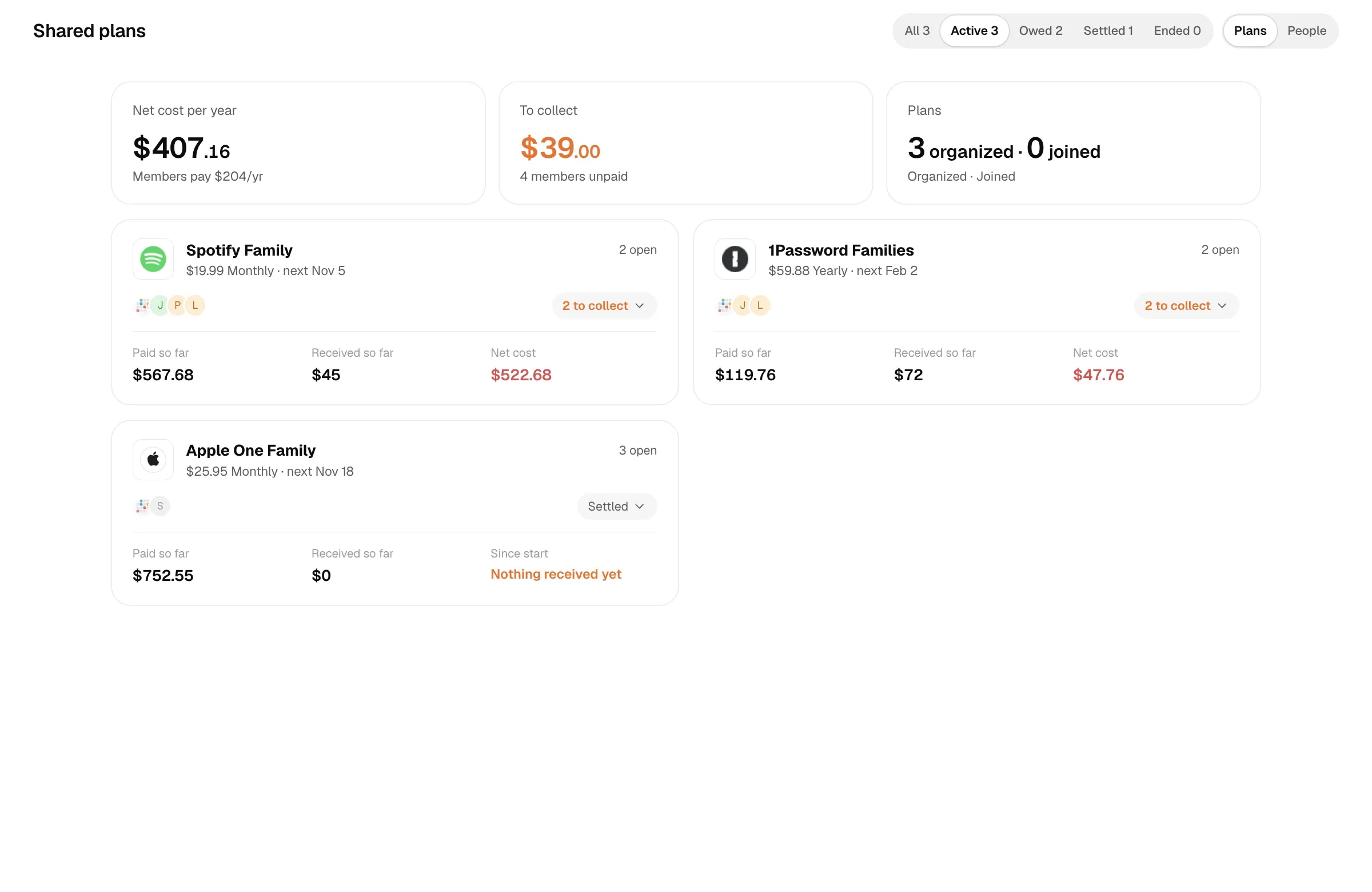
After hosting or joining a shared plan, use this guide to manage members’ billing periods, payments and your net cost.
A shared plan has two roles:
- I host: the subscription is recorded at full price, charged to your card, and you collect from members. Your monthly cost only counts what’s left after members’ shares.
- I joined: you’re in someone else’s family plan. Enter only your own share as the amount, plus who you pay (the host).
Making a plan shared
Section titled “Making a plan shared”- In the subscription editor, set Who uses it to I host or I joined.
- When hosting, set Total seats (incl. you) and add members. When joining, enter only your own share as the amount and fill in Host.
- Save and open it on Shared plans to check members, seats and net cost.
Existing subscriptions with tags such as “family” or “shared” appear under Possibly shared. Make shared lets you choose a role and total seats, with a suggested per-person share when hosting.
Members
Section titled “Members”In a shared plan, click Add member, or click a member to edit.
| Field | Meaning |
|---|---|
| Name | Pick someone from the people list or create a new person. The same person is recorded once across all plans and paid-for subscriptions. |
| Contact | A channel (WeChat, Telegram, email, phone and so on) plus the account; you can open the app in one click. |
| Invited account | The email or username invited into the family group. |
| Joined | Defaults to the day the plan started. |
| Left | After this date they no longer take a seat or owe anything; past payments are kept. |
| Billing | How often they pay you (monthly, quarterly, every 6 months, yearly) and how much each time. The currency defaults to Settings → Bookkeeping → Shared plan currency (or the base currency if unset). |
| Doesn’t pay | Takes a seat but pays nothing — your second account, or family. |
| Source | Which group they came from or who referred them. |
| Paid through | The date they’ve paid up to (inclusive). Leave empty if they’ve never paid. |
A member’s billing period can differ from the subscription’s: the subscription may be charged monthly while a member pays you yearly.
Groups by billing period
Section titled “Groups by billing period”The plan detail groups members by their own billing period: monthly, quarterly, six-monthly, yearly, and Doesn’t pay. Members in a group can pay different amounts. Receipts below are grouped by the period they cover, newest first. The Paid tab groups outgoing subscription charges by year, and receipts from former members are kept.
Share per period
Section titled “Share per period”The share per period is how much of each subscription period a member covers (in the subscription’s currency). It’s derived from their billing:
share per period = their fee converted to the subscription currency at the rate when saved × months per subscription period ÷ months per billing periodFor example, with a subscription at 22.99 USD a month and a member paying you 600 CNY a year: if the rate when saved is 1 USD = 7.50 CNY, 600 CNY is 80 USD; divide by 12 to get about 6.67 USD per month. If the subscription’s currency or cycle changes, shares are recalculated from each member’s fee.
Total seats includes you. Seats taken = members still on the plan + 1. When it’s full it shows Full and no more members can be added.
Collecting payments
Section titled “Collecting payments”When a member pays you, click Collect next to them, or open the member and record a payment:
- amount and currency, defaulting to their billing;
- Covers from and Covers until, set from the billing period and editable;
- Received on and a note (e.g. a bank transfer).
Their Paid through date moves to the end of the covered period. The same payment can be copied to other members, handy when several people pay at once.
How the amount owed is worked out
Section titled “How the amount owed is worked out”For each member who pays, starting the day after Paid through (or from their join date or the plan start if they’ve never paid), one more period is owed every billing period until today; members who left stop the day before their leave date. Amounts owed are calculated from the stored per-period share and billing period, then converted at current rates. With different currencies, this can differ from fee × periods. The current implementation stops listing member dues when there is no next subscription charge.
Filters on the Shared plans page show Active, Owed, Settled and Ended plans.
The yearly view and since the start
Section titled “The yearly view and since the start”The shared plan shows two sets of figures, both in the base currency:
Per year (expected)
| Figure | How it’s calculated |
|---|---|
| Cost / yr | The current phase’s full monthly cost × 12, at today’s rates. |
| Income / yr | Per-period shares of members still on the plan who pay × periods per year. |
| Profit / yr, Loss / yr | Income − cost. When members pay more than the subscription costs, it’s a profit. |
Since the plan started
| Figure | How it’s calculated |
|---|---|
| Paid so far | Every charge of this subscription since the plan started, at each charge’s own rate. |
| Received so far | All payments from all members (including ones who’ve left), at the rate of the day received. |
| Net gain / Net cost | Received − paid. |
If the start date isn’t set, the first payment date is used, then the earliest member join date, then the subscription’s start date.
The monetary totals at the top of Shared plans cover active plans you host: net cost (or gain) per year, what members pay per year, what’s owed (and by how many members), and how many plans you organize and have joined.
Reminders
Section titled “Reminders”With reminders on, each member’s next period triggers a reminder 7 days before, 3 days before and on the due day; once overdue, again on day 7 and day 14, then every 30 days. The reminder includes the member’s contact and the amount due.
Once the subscription has an end date and the next period would start on or after it, payment reminders stop. Members who don’t pay are never reminded. See Reminder rules.
Effect on monthly cost
Section titled “Effect on monthly cost”Monthly cost in Reports and the Overview only counts your part:
your share ratio = (price − per-period shares of members on board who pay) ÷ priceIf members’ shares add up to more than the price, the ratio is 0, your monthly cost is 0, and the surplus shows up as Profit / yr. Recovered from sharing/mo in Reports is the total members cover each month.
Net cost example
Section titled “Net cost example”Suppose Alex hosts a 30 USD monthly family plan. Three members each pay 8 USD monthly, all remain on the plan, and exchange rates do not change:
| Item | Calculation | Result |
|---|---|---|
| Full subscription cost | 30 × 12 | 360 USD/year |
| Members’ expected fees | 3 × 8 × 12 | 288 USD/year |
| Your cost | 360 − 288 | 72 USD/year, or 6 USD/month |
This is expected net cost, not proof that everyone paid. If Alex paid out 90 USD but collected only 48 USD, the actual net outlay since the start is still 42 USD. Changing Paid through alone does not create a receipt; record each payment to count it as money collected.
Managing shared plans with AI
Section titled “Managing shared plans with AI”The built-in assistant and MCP tools can do the same: set_share to make a plan shared, save_share_member to add or edit members, record_receivable to record payments, and get_carpool for free seats, the yearly view and who owes what.